


This is featured post 1 title
Replace these every slider sentences with your featured post descriptions.Go to Blogger edit html and find these sentences.Now replace these with your own descriptions.This theme is Bloggerized by Lasantha - Premiumbloggertemplates.com.
This is featured post 2 title
Replace these every slider sentences with your featured post descriptions.Go to Blogger edit html and find these sentences.Now replace these with your own descriptions.This theme is Bloggerized by Lasantha - Premiumbloggertemplates.com.
This is featured post 3 title
Replace these every slider sentences with your featured post descriptions.Go to Blogger edit html and find these sentences.Now replace these with your own descriptions.This theme is Bloggerized by Lasantha - Premiumbloggertemplates.com.
Showing posts with label Download ImageJ. Show all posts
Showing posts with label Download ImageJ. Show all posts
Monday, December 20, 2010
Sunday, November 21, 2010
Medical Image Processing tool:
 5:46 AM
 GCbioinfo
Now we are going to see how to view an image using imageJ on gcufbioinfo.
First save an image especially a medical image to your system and copy this image and go to C derive then program files and then imagej folder and paste this image into it. then open imageJ from start menu and click file >open as shown in gcufbioinfo and select the picture to view.
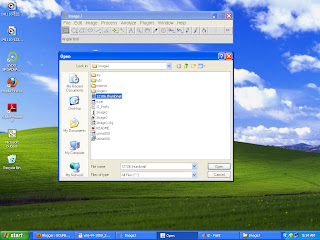 you can view your image using this tool .
First save an image especially a medical image to your system and copy this image and go to C derive then program files and then imagej folder and paste this image into it. then open imageJ from start menu and click file >open as shown in gcufbioinfo and select the picture to view.

Download ImageJ:
4:50 AM
GCbioinfo
To download imageJ first go to the http://rsbweb.nih.gov/ij/
the page will open
 click download
http://rsbweb.nih.gov/ij/download.html
then get latest version of imageJ for your OS . If you are new to use ImageJ then Download ImageJ 1.43 bundled with 32-bit Java 1.6.0_10 (25MB) other wise download without java for windows OS.
the page will open

http://rsbweb.nih.gov/ij/download.html
then get latest version of imageJ for your OS . If you are new to use ImageJ then Download ImageJ 1.43 bundled with 32-bit Java 1.6.0_10 (25MB) other wise download without java for windows OS.


